A Pet Figurine from Your Favorite Photos
Upload one to five photos of your pet and get a pet figurine model for resin or multi-color PLA: untextured usually in under a minute, full color in 3 to 5 minutes.
- Up to 5 photo angles
- Resin or multi-color PLA
- STL and 3MF exports
- 3 free credits
By SupaVoxel Team·Updated
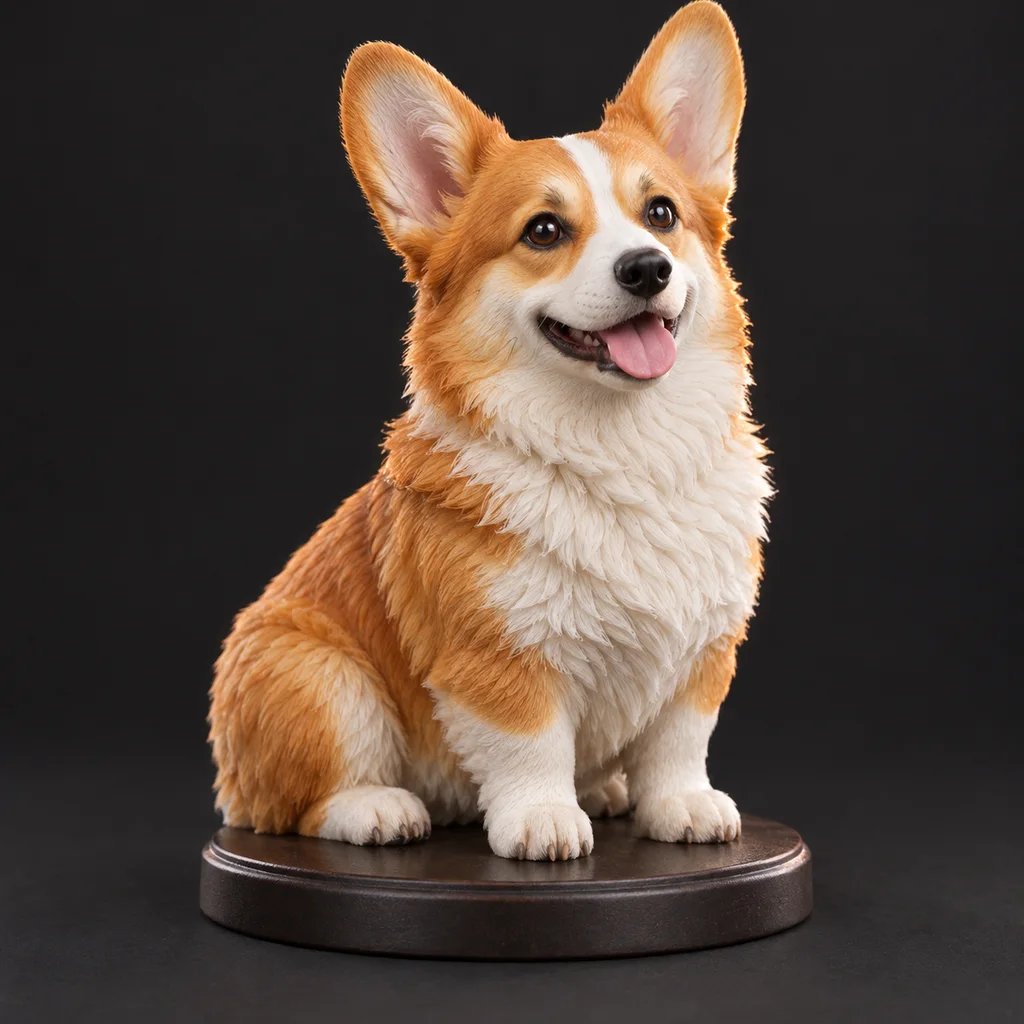
Drop in a picture, get a 3D model
3 free credits · Google sign-in · no card
Who a custom pet figurine is for
Most people who look for a way to 3D print my pet want one of two things. Some want a fun desk figure of the dog or cat on the couch next to them. Others want a pet memorial figurine of an animal they have lost, made from the photos they still have. Both start the same way: good photos and a careful look at the model before printing.
SupaVoxel makes the 3D file. It does not print or ship figures. You print the pet figurine on your own printer, or send the STL to a local print shop or online print service. That keeps the cost low: the model itself costs 1 to 3 credits, and the print is whatever plastic or resin it takes.
How to make a pet figurine from photos
From photo to a printed figure. Most of the time goes into choosing the photo and into printing; the AI step is short.
- 01
Pick the best photo
A clear three-quarter view with the whole animal in frame, eye level, soft light. Add up to 4 more photos from other angles, especially the back and side, so the AI does not have to guess. - 02
Choose untextured or textured
Untextured (1 credit, usually under a minute) if you will print in resin or paint it. Textured (3 credits, 3 to 5 minutes, paid plan) if you want coat colors for a multi-color print. - 03
Check the likeness
Rotate the model and compare ears, muzzle, tail and markings with your photos. If something is off, try a different main photo; failed generations refund automatically. - 04
Repair, base and export
Repair makes it a watertight solid. Add a round or oval base, then export STL for resin or single-color prints, or a 4-color 3MF for a Bambu AMS. - 05
Print and finish
Print at 0.05 mm in resin or 0.12 mm in PLA. Paint resin prints by hand, or print multi-color PLA straight from the 3MF.
Pet figurine examples made from photos
Each model below came from pictures of one animal. Click a card to rotate the real 3D model and look at it from every side.
Photos that make a good pet figurine
The AI turns what it sees into a shape, so the photo sets the ceiling. Get down to your pet's eye level and shoot in window light, not with a flash. The whole body should be in frame, including paws and tail, with the animal standing or sitting rather than curled in a blanket.
Fur is the hard part. The model turns fur into a sculpted surface, not individual hairs, so long-haired breeds come out smoother than they look in photos. Markings on a short coat come through as color in a textured model, not as shape. For a memorial with only a few old photos, pick the sharpest one as the main image and add the others as extra angles even if the pose is different; the AI uses them to understand the animal.
- Three-quarter view beats a straight-on face photo
- Plain floor or wall behind the pet; the background is removed anyway
- Avoid collars with tags, harnesses, toys in the mouth or people in the shot
- Use the original photo file, not a screenshot of a social post
Ways to print your pet figurine
Same model, three ways to make it physical. Pick by the look you want and the printer you have.
Resin, hand painted
- Best for
- Most detail, display pieces, memorials
- File
- STL
- Settings
- 0.05 mm layers, tilted, supports under chin and tail
Multi-color PLA (Bambu AMS)
- Best for
- Coat colors without painting
- File
- 4-color 3MF
- Settings
- 0.12 mm layers, 3 walls, tree supports
Single-color PLA
- Best for
- Quick and cheap, paint later
- File
- STL
- Settings
- 0.12 mm layers, 3 walls, 10–15% infill
Print shop or service
- Best for
- No printer at home
- File
- STL or 3MF
- Settings
- Ask for resin for small figures under 80 mm
| Method | Best for | File | Settings |
|---|---|---|---|
| Resin, hand painted | Most detail, display pieces, memorials | STL | 0.05 mm layers, tilted, supports under chin and tail |
| Multi-color PLA (Bambu AMS) | Coat colors without painting | 4-color 3MF | 0.12 mm layers, 3 walls, tree supports |
| Single-color PLA | Quick and cheap, paint later | STL | 0.12 mm layers, 3 walls, 10–15% infill |
| Print shop or service | No printer at home | STL or 3MF | Ask for resin for small figures under 80 mm |
Multi-color steps are in the Bambu Lab guide and resin steps in resin miniatures.
Making a pet memorial figurine
A memorial piece deserves a little more care than a desk toy. Choose a pose that feels like your pet: lying with the head on the paws, sitting at the door, or the way they slept. Generate a few versions from different photos and keep the one that looks most like them; each untextured try costs 1 credit.
For the finish, a resin print painted by hand gets the closest to real coat colors and eyes. If you want something simpler, a matte white or stone-colored print looks like a small sculpture and does not need painting. Add a base wide enough for a name: our free 3D text generator makes raised lettering you can glue on, and the lithophane maker turns a favorite photo into a light-up panel to stand beside it.
- Print a test at half size before the final piece
- Matte filament or primer hides layer lines on calm, smooth poses
- Glue the figure to a wooden base for a heavier, gift-like feel
- A print shop can do the print if you do not own a printer
Do and don't for a custom pet figurine
The habits that separate a likeness from a generic dog or cat.
- Check the STL in the free STL viewer on any device before printing
- Use extra angles for breeds with distinctive backs or tails
- Scale small pets and large pets to the same height for a matching set
- Add a base with the free add-a-base tool so it stands steadily
- Try two or three photos and keep the best result
- Use blurry, dark or flash photos with red eyes
- Crop the paws or tail out of the main photo
- Expect every whisker or long hair to print
- Print tiny figures under 40 mm in PLA; use resin for small sizes
- Ask for 16 colors on a single AMS; it holds four
Frequently asked questions
How do I 3D print my pet from a photo?
How much does a custom pet figurine cost?
Will the figurine look like my pet?
Can I make a pet memorial figurine from old photos?
What size should a pet figurine be?
Can I print it in my pet's colors?
How long does it take?
Can I sell custom pet figurines to customers?
Keep going
Make a pet figurine from your photos
Upload a photo of your pet and get a 3D model you can print at home or at a print shop.
No credit card required · 3 free credits to start